Posts

Showing posts with the label ABAP Tips

How to Open Outlook Mail from ABAP

We know that there is option to send mail directly from ABAP, but it uses SAP account to send email. In many cases we may not have access or configuration to send email from SAP directly. In certain scenario it might be necessary to send email with outlook, but we want SAP to populate some text/information in advance. We will be using OLE objects for the same.     DATA : lr_outlook  TYPE  ole2_object ,         lr_mi  TYPE  ole2_object ,         lv_body  TYPE  string ,         lv_sig  TYPE  string .    CREATE  OBJECT lr_outlook  'Outlook.Application' .    CALL  METHOD  OF       lr_outlook        'CreateItem'  =  lr_mi      EXPORTING       #1         ...
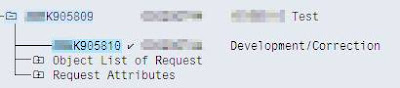
Few Tips for Transport Request Manipulation

Image
DON’T USE THESE UNLESS ABSOLUTELY NEEDED. The purpose of transport request is to organize and move development objects from one server (say development) to other server. But sometime due to conflict in timing of different releases, we may need to move objects from one transport to other transport to release lock / dependency / to avoid transport failure due to missing object. It’s not very easy task always, especially if the Transports are complex and contain multiple components. Things get more difficult if objects are locked in one transport or the transport is partially released (few tasks are released and locked object is inside that task). These off hand tips will help developer to manipulate transport request if complex situation arises. These methods are not very advisable as this may lead to transport inconsistency if not done properly or with proper understanding of the consequences. How to toggle the status of a Transport request? Here is a transport request where o...

How to Read data from Excel File

DATA : i_data2 TYPE STANDARD TABLE OF alsmex_tabline, wg_data2 TYPE alsmex_tabline. DATA : l_b_col TYPE integer VALUE 1 , "Begining Column Position l_e_col TYPE integer VALUE 12 , "Ending Column position l_b_row TYPE integer VALUE 1 , "Begining Row position l_e_row TYPE integer VALUE 60000 . "Ending Row position CALL FUNCTION ’ALSM_EXCEL_TO_INTERNAL_TABLE’ EXPORTING filename = p_p_path i_begin_col = l_b_col i_begin_row = l_b_row i_end_col = l_e_col i_end_row = l_e_row TABLES intern = i_data2 EXCEPTIONS inconsistent_parameters = 1 upload_ole = 2 OTHERS = 3 . IF sy-subrc EQ 0 . LOOP AT i_data2 INTO wg_data2. CASE wg_data2-col . WHEN 1 . wg_data1-pernr = wg_data2- value . WHEN 2 . wg_data1-zname = wg_data2- value . WHEN 3 . wg_data1-emptyp = wg_data2- value . ENDCASE . AT END OF row. APPEND wg_data1 TO i_data1. CLEAR : wg_data1. ENDAT . ENDLOOP . ELSE . * Error Message ENDIF .

How to Change SAP Standard Data Element Text

Image
How to Change SAP Standard Data Element Text Go to Transaction -> CMOD Method 1: Method 2: Add this code Format is as follows DEFINE &BELEG& = ’a <GL: Old Name > New Name </>’ Old Name should be in small letters. Spaces should be replaced by _ (underscore) To get the list of all such modifications

MS Word Editor for Foms

MS Word editor option can be activated using the transaction I18N

How to Measure Execution Time

You can improve the performance of your code by measuring execution time of your program. You can use SAP Standard tools for over all performance of you program. The SAP Standard tools are * Run Time Analysis (SE30) * SQL Trace (ST05) Apart from these tool you can measure your block of code with simple ABAP coding. But you can do it during development phase only. At the end you have to remove the coding. This technique of measuring code can be helpful if you want top tweak your select queries. GET TIME STAMP FIELD t1. *Block of Code ................... GET TIME STAMP FIELD t2. runtime = t2 - t1.

How to Debug Background Jobs

We can not debug background jobs directly with the breakpoints set inside the program like usually we do during running program in foreground. But this is posibile too !! Go to SM37 - Job monitor Select the specific job you want to analyse (let's a failed job) Use transaction code - JDBG (type the transaction code in transaction code input box - at the top left corner of your screen) It will start ABAP debugger. Continue to debug !!

Sample Program to Create Sales Order – Create Billing Doc – Attach a PDF Document and Release to Accounting

This sample program will create sales order from a data feed from a file, create billing document for those orders, attach a PDF document for these billing document and release those documents to accounting. This program can also be referred to get sample code for following SAP Function modules: SD_SALES_DOCUMENT_INIT SD_SALES_DOCUMENT_COPY SD_SALES_DOCUMENT_SAVE SD_SALESDOCUMENT_CHANGE Though this program uses a Z function module to attach a PDF document to the billing document (invoice) I will share the source code for the same in my next post. border-width:1px;border-color:3C3C3C;border-style:solid;"> *&---------------------------------------------------------------------* *& Report name : Conversion Program - Cost Centre Copy *& Purpose : This program will create invoices from data *& provided through a flat file. This program *& is needed for ePT project - migration of open *& ...